Why Tenants Prefer Mobile Rent Payments
By Rewa Editorial Team
Mobile rent apps centralise payments, receipts and reminders—reduce cheque hassle but check fees, settlement times and landlord approval.
Why Tenants Prefer Mobile Rent Payments
Mobile rent payments put payments, status updates and receipts in one place. Before switching, tenants should get written landlord approval, settle cheque arrangements and check fees and settlement times. An app does not change the rent due date.
UAE rent agreements commonly use one to six instalments, depending on the lease. Where accepted, Rewa supports credit-card and bank-transfer payments, PDF receipts and points on eligible rent payments.
The checks are simple:
- Payment terms: Paying by card does not automatically mean monthly instalments.
- Total cost: Compare rewards in AED with payment fees and card interest.
- Payment records: Confirm funds have arrived, save receipts and check pending or duplicate payments before paying again.
- Account safety: Review reminders and Auto-Pay settings, verify recipient details and never share one-time passwords.
Rewards for travel, dining and fitness are a bonus. The main test is whether the switch means less paperwork, clearer records and fewer payment questions.
How Mobile Apps Reduce Rent Paperwork
UAE rent payments often mean cheques, manual transfers and receipts stored in different places. Rewa brings payments, tracking and confirmations into one place.
The app supports credit card and bank-transfer payments, with tracking and secure processing. This cuts manual steps and keeps payment records together.
Pay by Credit Card or Bank Transfer
Your payment method needs to match your tenancy terms. Paying by credit card does not automatically mean monthly instalments. Check instalment options, interest and repayment terms with your card issuer.
Before authorising payment, confirm the landlord and property details. Review the amount, any charges and the expected settlement date, then save the confirmation. Authorisation alone does not mean the funds have arrived, so check that the payment has been received.
Track Payment Status and Due Dates
After paying, use the app’s status labels to check whether your payment is submitted, processing or settled. Review the current notification and reminder settings, and confirm which date Auto-Pay uses before relying on it.
Process and Verify Payments Securely
Rewa states that it uses secure, automated processing and transaction verification, making payments traceable. Its published materials also say landlords receive the full agreed rent directly into their registered bank account, with no platform fees for landlords.
Use the official app, verify the recipient’s IBAN and never share one-time passwords. Credit-card payments may carry a fee, so check the charges before confirming.
sbb-itb-80e96b1
How Rent Rewards Work
Rewards are an added perk alongside payments and tracking.
Earn Points on Eligible Rent Payments
Rewa awards points on eligible rent payments, subject to the offer’s terms, limits and timing. Points are usually linked to the rent amount and may be released monthly throughout the rental term.
Compare the rewards’ value in AED with payment charges and card interest.
Redeem Points for Travel, Dining and Fitness
Rewa lists travel, dining and fitness among its redemption categories. Check the app for current redemption terms.
Compare the points needed with the regular price. Then check restrictions, expiry dates, taxes and any booking charges. A reward is only worth using if it offers value after fees and restrictions.
Before switching, weigh the rewards against the full cost of paying this way.
Measure Tenant Satisfaction and Loyalty
Easier payments and rewards can improve tenant satisfaction, but loyalty is not automatic. Track whether payment questions decrease, records become clearer and tenants show greater intent to renew.
Ask separately about payment convenience and the usefulness of rewards in tenant surveys. This helps show which part tenants value.
What to Check Before Switching
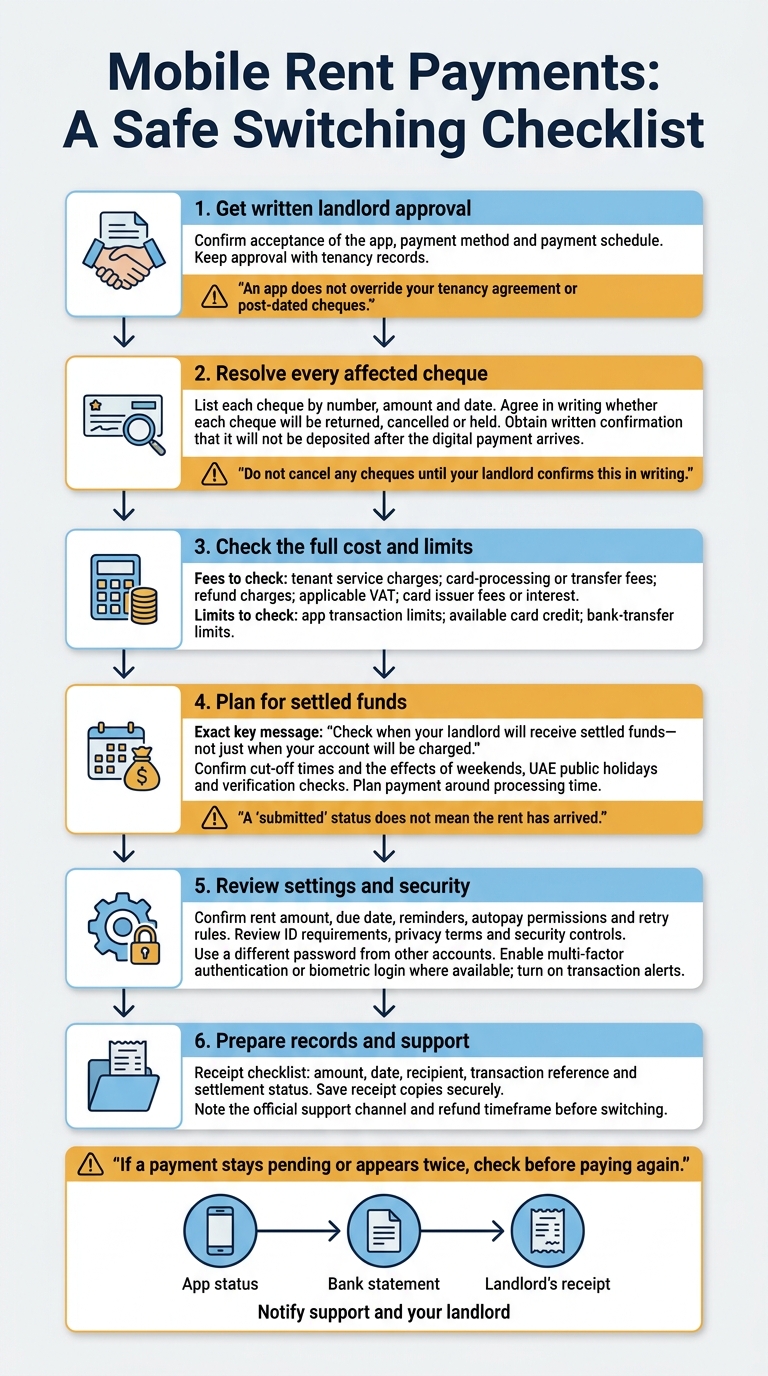
Mobile Rent Payments: A Safe Switching Checklist
Before switching, make sure the app fits your lease, payment schedule and record-keeping needs.
Confirm Landlord Acceptance and Cheque Arrangements
An app does not override your tenancy agreement or post-dated cheques. Get written approval from your landlord or property manager for the app, payment method and payment schedule. Keep that approval with your tenancy records.
Before your first payment, list every affected cheque by number, amount and date. Agree in writing whether each cheque will be returned, cancelled or held. Ask for written confirmation that it will not be deposited after the digital payment arrives. Do not cancel any cheques until your landlord confirms this in writing.
Check Fees, Limits and Payment Timelines
Ask for a full fee breakdown before paying. Check tenant service charges, card-processing or transfer fees, refund charges, applicable VAT, and any card issuer fees or interest. Also confirm the app’s transaction limits, your available card credit and your bank-transfer limits.
Check when your landlord will receive settled funds - not just when your account will be charged. Confirm cut-off times and how weekends, UAE public holidays and verification checks affect settlement. Plan your payment around that processing time. A ‘submitted’ status does not mean the rent has arrived.
Review Reminders, Receipts and Account Security
Check the rent amount, due date, reminders, autopay permissions and retry rules. Review ID requirements, privacy terms and security controls. Use a different password from your other accounts, enable multi-factor authentication or biometric login where available, and turn on transaction alerts.
Make sure receipts show the amount, date, recipient, transaction reference and settlement status. Save copies securely, and note the official support channel and refund timeframe before switching.
If a payment stays pending or appears twice, check before paying again. Compare the app status, your bank statement and your landlord’s receipt, then notify support and your landlord.
Conclusion: Less Paperwork, Clearer Rent Records
Mobile rent payments cut cheque handling, keep rent records clearer and make due dates easier to track - provided the landlord agrees and the costs are clear.
With Rewa, eligible rent payments can earn points for travel, dining and fitness. Treat these as a bonus, not a saving.
After one or two billing cycles, compare rent queries, on-time payments and receipt clarity with the previous process. Ask tenants whether reminders, receipts, costs and rewards are clear.
Judge the change by fewer queries and clearer records - not adoption alone.
FAQs
What happens if my rent payment settles late?
If you miss a rent payment on Rewa, you can still pay through the app, with secure processing and automated tracking. But only payments made in full and on time qualify for Rewa reward points.
Unpaid rent could put you in arrears and may lead to eviction proceedings under UAE regulations. To help you stay on track, the app sends automated reminders before your payment is due.
Can I reverse a rent payment sent by mistake?
A rent payment sent by mistake can be hard to recover. Completed bank transfers are typically irreversible, so act quickly.
If you paid through Rewa, contact Rewa support and provide both transaction references for help resolving the issue. Where applicable, start a refund or dispute resolution from the Payments dashboard.
What happens to my points if I end my tenancy early?
You earn Rewa Points only when you pay your rent in full and on time through the Rewa app. Points are calculated on the total rent paid, then released in equal monthly portions over the period your payment covers. You won’t earn additional points for months outside that period.
Check your points balance in the app and redeem your points before moving out.