Say Goodbye to Rent Cheques: How to Switch to Digital Card Payments
By Rewa Editorial Team
Switch rent payments from cheques to card: get written landlord approval, check fees and card limits, and confirm receipts.
Say Goodbye to Rent Cheques: How to Switch to Digital Card Payments
Switching rent from cheques to card payments starts with written landlord approval - not a card charge. Agree on payment dates, fees and cheque returns, then confirm the landlord’s Rewa registration before paying.
Rewa lists a 0.95% one-off card fee: AED 95 on AED 10,000 rent, before other charges. Landlord payouts are listed as taking 1–2 UAE business days, so payment needs to start before the rent deadline.
Before switching:
- Check the card and total cost. Confirm UAE-issued Visa or Mastercard eligibility, available funds or credit, issuer charges and repayment terms.
- Complete setup and verification. Check tenancy details and protect account access.
- Confirm receipt before retiring cheques. Keep existing cheques covered by the written agreement until the first digital payment reaches the landlord.
- Plan future payments. Check recurring-payment settings, save receipts and cancel recurring instructions when the tenancy ends.
The key distinction: a card approval is not proof that the landlord has received the rent.
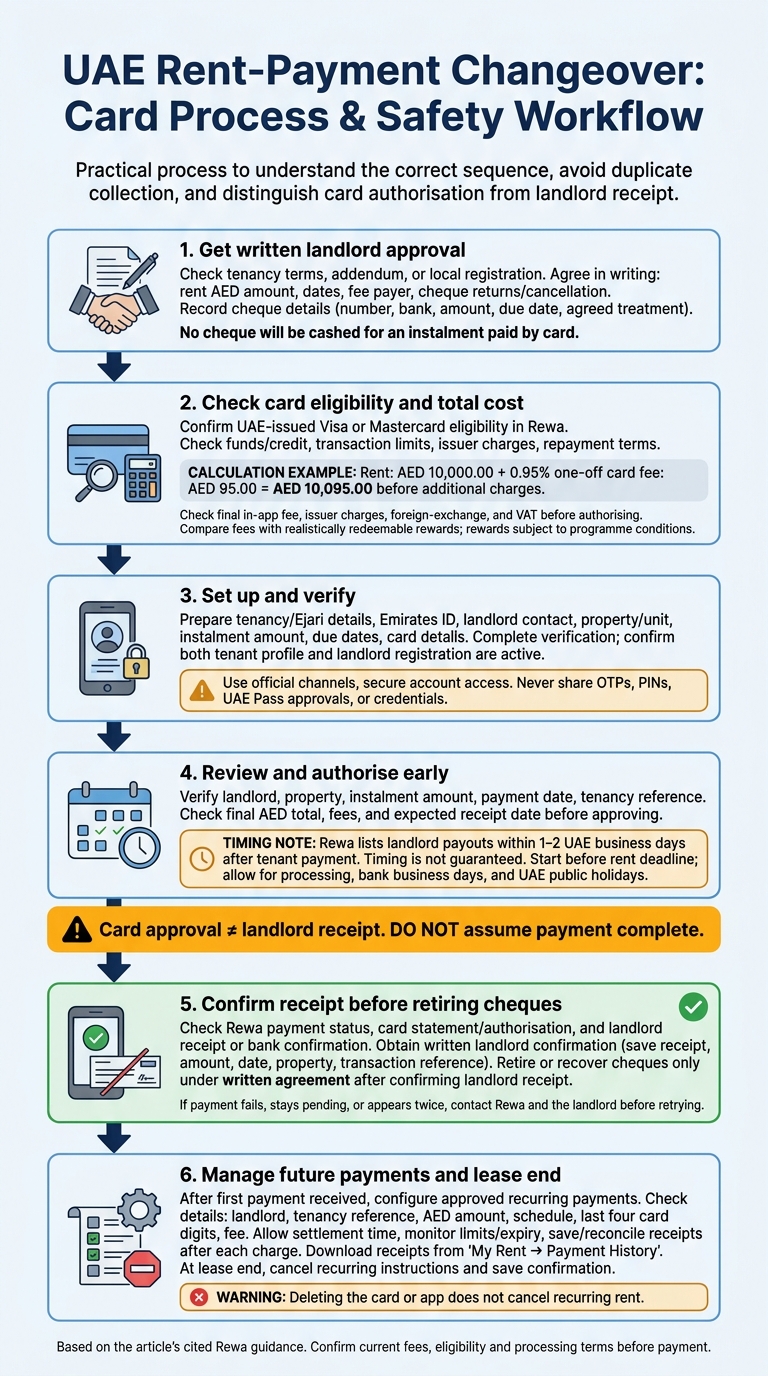
How to Switch Rent Cheques to Digital Card Payments
Get Landlord Approval to Change Payment Terms
Check your tenancy agreement for payment terms, notice rules and any clause covering post-dated cheques. In Dubai, confirm whether changing the Mode of Payment requires a signed addendum.
Send a written request to the landlord or authorised property manager. Include the property address, tenancy reference, rent amount, proposed provider, payment dates, fees and start date. Get written approval and use it as the basis for the payment-date and cheque-return agreement below.
Agree on Payment Dates and Cheque Returns
Put the agreed amount in AED, due dates and card-fee payer in writing. Also confirm whether partial payments are accepted and what counts as payment. Use DD/MM/YYYY for dates and Gulf Standard Time for cut-off times.
Record each cheque’s number, bank, amount, due date and agreed treatment. Get written confirmation that no cheque will be cashed for an instalment paid by card.
If cheques stay with the landlord as security during the changeover, document when they’ll be returned or cancelled. Agree how any duplicate collection will be refunded. Don’t stop payment on existing cheques without an agreed arrangement.
Confirm How Rent Payments Will Be Recorded
Match every payment to your tenant name, property address, unit number, tenancy reference and rental period. Ask for a landlord receipt or rent ledger entry showing the amount credited and the date received. Card authorisation alone doesn’t prove which instalment was credited.
Confirm whether the change requires a lease addendum or an Ejari update in Dubai. In other emirates, follow the local registration rules. Keep the approval with your tenancy record. With approval and records in place, move on to card eligibility and fee checks.
sbb-itb-80e96b1
Check Rewa Card Eligibility and Costs
Before switching from cheques, check that your card is eligible and the total cost fits your rent schedule.
Use the Rewa app to confirm whether your UAE-issued Visa or Mastercard debit card is eligible. Check the card issuer, network and country of issue, particularly for prepaid or foreign-issued cards. Then review the full cost before authorising payment.
Compare Fees with Rewards
Rewa’s help centre lists a 0.95% one-off card fee. Check the payment screen before authorising: banking charges and applicable VAT may change the total.
Before you confirm payment
| Item | What to check |
|---|---|
| Rent | Exact contractual amount |
| Card fee | Fee shown in-app; currently listed as 0.95% |
| Issuer charges | Any cash-advance or similar fee |
| Foreign-exchange charges | Any currency-conversion or international-processing charge, even when paying in AED |
| VAT | Whether VAT applies to the fee and is included |
| Total charge | Rent plus all fees and applicable VAT |
| Available credit | Enough to cover the total charge and pending transactions |
| Due date | Agreed contractual deadline |
| Settlement date | Expected date the landlord will receive payment |
| Expected rewards | Eligible Rewa Points and redemption terms |
For rent of AED 10,000.00, a 0.95% card fee is AED 95.00, making the total charge AED 10,095.00 before additional charges.
Compare the fee in dirhams with the rewards value you can realistically redeem. Redemption rates can change. Points are released monthly over the covered period, subject to programme conditions, including full, on-time payment.
If the cost fits your budget, check the limits and repayment terms next.
Check Card Limits and Repayment Terms
Check your available credit, daily and online limits, and any monthly transaction limit. Available credit must cover the rent and every fee. Ask your issuer whether Rewa payments carry cash-advance or similar charges, attract immediate interest, or have no interest-free period. Pay the full statement balance on time to avoid interest.
For instalments or pay-later terms, compare total repayments, including interest or profit, processing fees, monthly fees and applicable VAT. Review the missed-payment, early-settlement and termination terms before accepting. Keep card repayments separate from your landlord’s rent deadline.
Set Up Rewa and Check Your First Payment
Prepare Your Documents and Secure Your Account
Once your landlord has approved the switch and the card checks are complete, start the setup before your rent is due. Leave time for identity checks and landlord registration.
Have your tenancy agreement or Ejari details, Emirates ID, landlord contact details, property and unit number, instalment amount, due dates and card details ready. Check these against your tenancy agreement, then open Rewa through its official website or app. Complete verification, add your tenancy and confirm that your profile and landlord registration are both active.
Choose a password you don’t use elsewhere, enable a device lock and use multi-factor authentication where available. Never share OTPs, card PINs, UAE Pass approvals or account credentials. Enter authentication codes only within the genuine payment flow.
Enter Rent Details and Authorise Payment
Once your account is ready, enter the agreed rent details. Check the landlord, property, instalment amount, payment date and tenancy reference against your agreement.
Before authorising, review the final AED total, fees and expected receipt date. Read the cancellation terms, and approve only if the bank’s authentication request matches your payment.
Allow time for provider processing, bank business days and UAE public holidays. Rewa says landlord payouts are processed within 1–2 UAE business days after tenant payment. This timing isn’t guaranteed, so pay before the due date.
Confirm the Landlord Has Received Payment
After authorising, check Rewa’s payment status and transaction reference, your card statement or authorisation, and the landlord’s receipt or bank confirmation. An OTP or card authorisation alone does not mean your landlord has received the rent.
Ask your landlord to confirm receipt in writing. Save that confirmation alongside the digital receipt, amount, date, property and transaction reference, and check for duplicate charges.
If the payment fails, stays pending or appears twice, contact Rewa and your landlord before retrying. Share the transaction reference and confirm whether your card was charged.
Conclusion: Manage Future Rent Payments
After the first payment clears, keep future rent payments digital only if your landlord has approved the switch and you’ve confirmed the fee, account and receipt details.
Set Up and Check Recurring Payments
Once your landlord confirms receipt of the first payment, set up only the approved rent payments you want to repeat. Before saving Auto-Pay, check the landlord, tenancy reference, rent amount in AED, payment schedule, last four digits of your card and fee.
Allow enough time for settlement before the due date, especially around UAE public holidays. Check your available card limit and expiry date too.
If a payment fails or is delayed, check the dashboard or alert, then review your card limit, expiry date and bank message. Contact Rewa and notify your landlord. If the due date is close, use an agreed backup payment method.
After each recurring charge, save the receipt and match it to your tenancy schedule.
Keep Records and Cancel Payments at Lease End
Keep your payment records in order throughout the lease, then cancel recurring instructions when the tenancy ends.
Download PDF receipts from My Rent → Payment History. Store them with your tenancy agreement, approval, fee details, payment schedule, transaction references, card statements and related notices. Use each payment reference to match the amount, date and status against your card statement and your landlord’s rent ledger. These records can help resolve duplicate charges, late settlement and move-out disputes.
Review recurring permissions when you replace a card or renew your tenancy. Deleting the card or app does not cancel recurring rent. Cancel recurring rent at lease end and save the confirmation.
FAQs
Can I pay rent monthly if my lease requires quarterly cheques?
Yes, usually - but your landlord must agree, and you’ll need to update the payment schedule. Rewa follows the schedule in your tenancy contract. Before switching, check in the app that monthly payments are available for your property, then agree on the due dates and terms with your landlord.
Rewa won’t cancel existing post-dated cheques. Agree with your landlord which cheques, if any, to keep, return or void.
Who is responsible if my rent payment arrives late?
You’re still responsible for meeting your tenancy obligations. Rewa is a technology platform, not a bank or payment service provider, and does not guarantee rent settlements. Payments depend on sufficient funds and the processing times of your payment provider and bank.
If a payment fails or is delayed, check its status in the app, confirm your payment method details and contact support if needed. Missed payments may result in arrears and legal consequences.
How are card payments refunded if my tenancy ends early?
If your tenancy ends early, you can request a refund through the Payments dashboard in the Rewa app. Open your transaction history, select the payment, then choose the option to issue a refund.
For help with payment issues or disputes, contact support via the in-app chat or visit the website’s Help Centre.